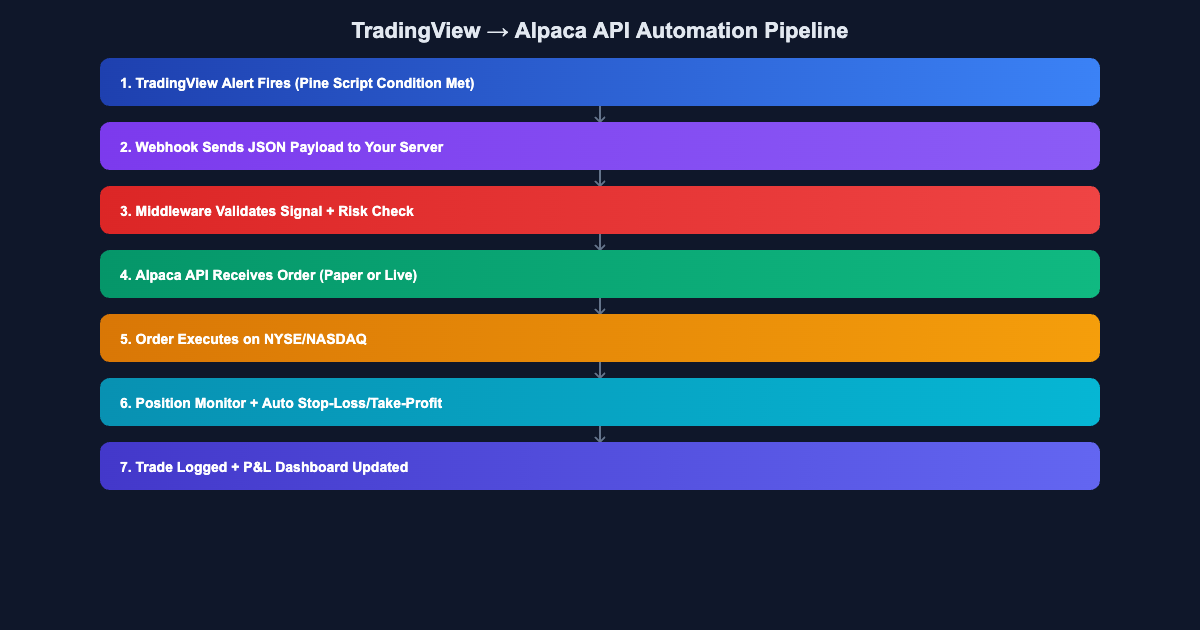
If you’re a US-based trader looking to automate your TradingView strategies without paying commissions, Alpaca is your best bet. Alpaca’s commission-free trading API combined with TradingView’s Pine Script alerts creates a powerful, fully automated trading system that runs 24/7 without you touching a button.
In this guide, I’ll walk you through the complete setup: from writing Pine Script alert conditions to configuring Alpaca’s API to execute real trades on NYSE and NASDAQ. Want someone to build this for you? Jayadev Rana builds professional TradingView-to-broker automation systems for traders worldwide.
Why Alpaca Is Perfect for TradingView Automation
Alpaca stands out for US traders for several reasons. First, it’s commission-free for stocks and ETFs—there are no per-trade fees eating into your algo trading profits. Second, it offers both paper trading and live trading through the same API, so you can test your system risk-free before going live. Third, it supports fractional shares, meaning your position sizing can be precise even with expensive stocks like AMZN or GOOGL.
The API is RESTful with excellent Python, JavaScript, and Go SDKs. For TradingView integration, you’ll use webhooks to bridge Pine Script alerts to Alpaca order endpoints. The latency is typically under 200ms from alert to order placement—fast enough for swing trading and most day trading strategies.
Setting Up Your Alpaca Account for API Trading
Start by creating a free account at alpaca.markets. Once registered, navigate to the API Keys section in your dashboard. You’ll get two sets of keys: one for paper trading (sandbox) and one for live trading. Always start with paper trading keys.
# Python: Test your Alpaca connection
from alpaca_trade_api import REST

api = REST(
    key_id='YOUR_API_KEY',
    secret_key='YOUR_SECRET_KEY',
    base_url='https://paper-api.alpaca.markets'
)

account = api.get_account()
print(f"Account Status: {account.status}")
print(f"Buying Power: {account.buying_power}")
Writing Pine Script Alerts for Alpaca
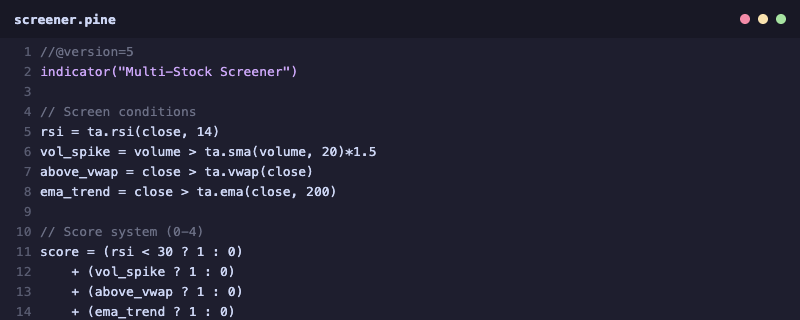
Your Pine Script indicator needs to generate structured JSON alerts that your webhook server can parse:
//@version=5
strategy("Alpaca EMA Strategy", overlay=true)

fast = ta.ema(close, 9)
slow = ta.ema(close, 21)
volFilter = volume > ta.sma(volume, 20) * 1.3

if ta.crossover(fast, slow) and volFilter
    strategy.entry("Long", strategy.long)
The JSON payload includes everything Alpaca needs: action, ticker symbol, quantity, and current price for logging.
Building the Webhook Bridge
You need a small server that receives TradingView webhooks and forwards orders to Alpaca. Deploy a Flask app on Railway, Render, or a VPS. Point your TradingView alert webhook URL to your server’s /webhook endpoint. The bridge receives JSON from TradingView, validates the signal, and submits the order via Alpaca’s SDK.
If setting up the infrastructure feels overwhelming, you can connect with a TradingView automation expert on WhatsApp for a complete turnkey solution.
Risk Management and Safety Features
Never deploy an automated system without safeguards. Add these to your webhook bridge: a maximum daily loss limit (halt trading if drawdown exceeds 2%), position size validation (reject orders larger than 5% of portfolio), market hours check (only execute during 9:30 AM – 4:00 PM ET), and duplicate signal prevention (ignore repeated alerts within 60 seconds).
Alpaca also has built-in protections: day trading pattern rules (PDT applies to accounts under $25K), buying power checks, and order rejection for invalid symbols.
Paper Trading to Live: The Migration Path
Run your system on Alpaca paper trading for at least 30 days before going live. Track total trades (expect 5-20 per week), win rate (target 50%+), average risk-reward ratio (target 1.5:1 minimum), maximum drawdown (should stay under 10%), and Sharpe ratio (above 1.0 is acceptable). When confident, simply swap the base URL from paper-api to api.alpaca.markets.
FAQ: TradingView + Alpaca Automation
Q: Is Alpaca really commission-free for automated trading?
A: Yes, Alpaca charges zero commission on stock and ETF trades. There may be minimal SEC/FINRA regulatory fees, but no broker commission.
Q: Can I trade options through Alpaca with TradingView?
A: As of 2026, Alpaca supports options trading via API. You can send options order parameters through your webhook bridge.
Q: What happens if TradingView’s servers go down?
A: Alerts won’t fire. Always have a trailing stop-loss set directly in Alpaca as a safety net, independent of TradingView alerts.
Q: Do I need a minimum account balance?
A: No minimum for Alpaca. However, the Pattern Day Trader rule requires $25,000+ for unlimited day trades. Compare other US platforms for alternatives.
Need a Custom TradingView Automation Setup?
Jayadev Rana is a professional Pine Script developer who builds custom indicators, strategies, and broker automation systems. Serving traders in the USA, Europe, and worldwide.
About the Author